cursor-plan-usage
Cursor IDE Extension to track Cursor Plan Usage in real time. Basically brings the data from Cursors Config tab into a more acessible tab.
Cursor Plan Usage
See your Cursor plan usage without leaving the editor.
Website · Live Cursor Models and Other Models percentages in a dockable sidebar and status bar — plus git-aware windows for spend since your last commit or while you’re on a feature branch.
You can easily install the extension through the Extensions tab inside Cursor:
Install on Open VSX · Report an issue
Features
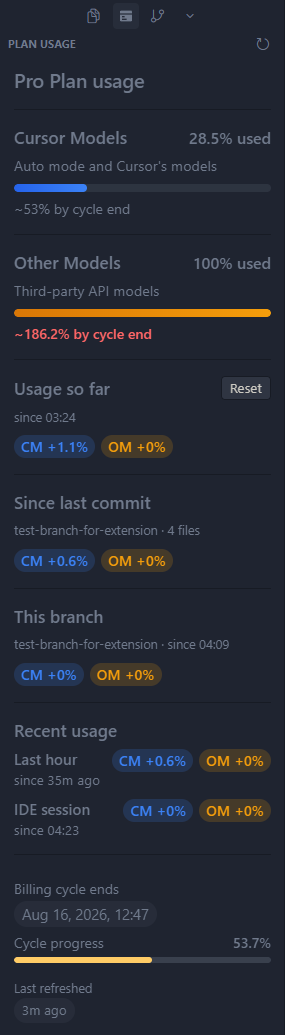
- Sidebar panel — CM / OM usage at a glance in the activity bar
- Status bar chip —
CM n% · OM n%cycle totals, or deltas for Usage so far / Since last commit / This branch - Billing cycle — progress through the period, end time, and a simple projection
- Session deltas — last-hour usage persists across reloads; IDE-session usage is since this Cursor window opened
- Usage so far — resettable window that persists across reloads; auto-resets on a new billing cycle
- Since last commit — plan % burned while the working tree is dirty; resets on each commit. Hidden when the tree is clean
- This branch — plan % while a feature branch is checked out; pauses on
main/ other branches and restores when you return. Hidden on the default branch - Smart refresh — updates on focus and AI activity; pauses when Cursor is unfocused
UI Example
Cursor only
This extension is built for Cursor, not plain VS Code. It reads Cursor’s local session data and talks to Cursor’s dashboard API. Install and run it inside Cursor.
Install
You can easily install the extension through the Extensions tab inside Cursor:
Or via Open VSX: Open VSX — CodyKoInABox/cursor-plan-usage
Or sideload a .vsix from a release.
Or clone the repo and build locally with npm run package
After install, open the Plan Usage icon in the activity bar, or run Plan Usage: Focus from the Command Palette.
Privacy
- Your access token is read from Cursor’s local DB into memory (or from Cursor SecretStorage if you set an override). It is never written to disk by this extension.
- The only network traffic is the usage request to Cursor’s API (
api2.cursor.shby default). - No telemetry. Your account email is not shown in the UI.
Commands
| Command | Description |
|---|---|
| Plan Usage: Focus | Open the Plan Usage sidebar |
| Plan Usage: Refresh | Force-refresh usage from the API |
| Plan Usage: Set Session Token | Store an optional session token in SecretStorage (overrides the local DB while set) |
| Plan Usage: Clear Session Token | Remove the override and fall back to Cursor’s local DB |
Auth order: SecretStorage override (if set) → otherwise token from Cursor’s local state.vscdb.
Settings
| Setting | Default | Description |
|---|---|---|
cursorPlanUsage.pollIntervalSeconds | 0 | Idle poll interval (seconds) while focused. 0 = adaptive (30s burst for 2 min after AI activity, then 3 min). Polling pauses while unfocused. |
cursorPlanUsage.refreshOnAiActivity | true | Refresh when Cursor’s local AI tracking DB updates |
cursorPlanUsage.statusBarMode | absolute | absolute shows cycle totals (CM 45% · OM 20%); usageSoFar shows deltas since your last Reset (CM +4% · OM +2%); sinceLastCommit shows deltas since HEAD while dirty; thisBranch shows deltas while the current feature branch is checked out |
cursorPlanUsage.apiBaseUrl | https://api2.cursor.sh | Dashboard API base URL |
There is no sessionToken setting — use the Set / Clear Session Token commands instead.
Troubleshooting
| Symptom | Fix |
|---|---|
| Could not read Cursor session from local DB: unable to open database file | Update to 0.3.2+. 0.3.1 could not open Cursor's WAL-mode state.vscdb. |
| No token found | Sign in to Cursor, or run Plan Usage: Set Session Token with a valid session token / JWT. |
| 401 / unauthorized | Re-sign into Cursor, or set a fresh token via Plan Usage: Set Session Token. |
| Remote-SSH / WSL | The extension runs in the local Cursor UI and uses the local session DB. If usage looks wrong in a remote window, use a local window or set a session token override. Since last commit / This branch need the built-in git API and stay hidden when it is unavailable in remote UI hosts. |
Notes
Uses unofficial Cursor Connect-RPC dashboard endpoints. Those APIs can change or break without notice.
License
MIT · Created by CodyKoInABox